In Mat3D Premium, it is possible to import the node geometry and node support reactions of a super structure designed in GT Strudl. This feature simplifies the process of designing foundations under the super structure. See Creating a New Workspace topic to learn about how to import a GT Strudl created superstructure information.
During the import process, a data file of type JSON that is created by GT Strudl must be specified. This JSON contains the node geometry and node support reaction information. During the import process, an option whether or not to import load combinations is available. If the option to "Import Load Combinations" is checked, the load combinations page in Mat3D creates as many Allowable and Ultimate Load Combinations as the number of load cases and assigns a load factor of 1 for each of the load case columns sequentially creating a diagonal identity matrix as displayed in the screen shots below.
When reactions are imported from JSON that were generated in GT Strudl, the coordinate system that is assumed by Foundation3D and Mat3D is as displayed in Reaction Coordinate System. In GT Strudl, the gravity axis can be either the Y axis as displayed below or Z axis. An option in GT Strudl allows the gravity axis to be Y or Z before exporting the node and reaction information to Mat3D.
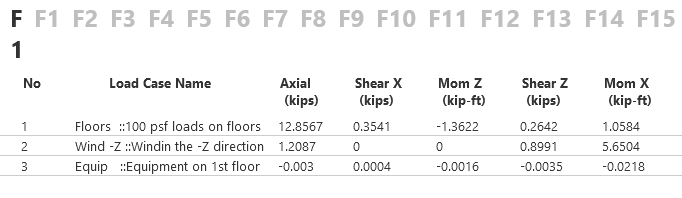
For eg if the load case names in a GT Strudl created structure are as displayed above, and if "Import Load Combinations" option is selected during the import, the Load Combinations page in Mat3D would display both Allowable and Ultimate load combinations as follows:

When a new workspace type is a "Single Mat Footing" type workspace, all the nodes contained in GT Strudl JSON will be imported onto a single mat foundation with a rectangular shape. A predetermined edge distance is added to the maximum extents in each orthogonal direction to obtain the mat size.
When a new workspace type is a "Footing Group" type workspace, each node contained in GT Strudl JSON will be imported onto its own spread footing creating a group of footings for all the nodes. The pier and spread footing dimensions are determined based on the geometry defaults specified in Project Settings in which the new workspace is created.